
Telegram Web Extension for Chrome
Overview
The Telegram Web Extension for Google Chrome provides a streamlined way to access your Telegram account directly from the browser’s toolbar. Designed for users who frequently switch between web pages and messaging, this tool delivers a simplified, pop-up interface that opens instantly with a single click. It enables users to view chats, manage settings, and receive real-time notifications without leaving their current workflow. The extension is particularly useful for professionals, students, and remote workers who rely on quick access to messages across multiple devices.
As an independent development effort, this extension is not affiliated with Telegram’s official team. Instead, it functions as a wrapper around the official Telegram web client, optimizing its usability within Chrome. Its primary purpose is to enhance accessibility and reduce friction in daily communication tasks. By integrating seamlessly into the browser environment, it ensures that users can stay connected without launching a separate application or navigating to a full website.
Real-world use cases include monitoring team communications during research, responding to urgent messages while browsing, or managing personal conversations without switching tabs. The developer emphasizes reliability, noting that the extension works consistently where others fail. This focus on stability addresses a common pain point among users of third-party Telegram tools.
Key Features & Capabilities
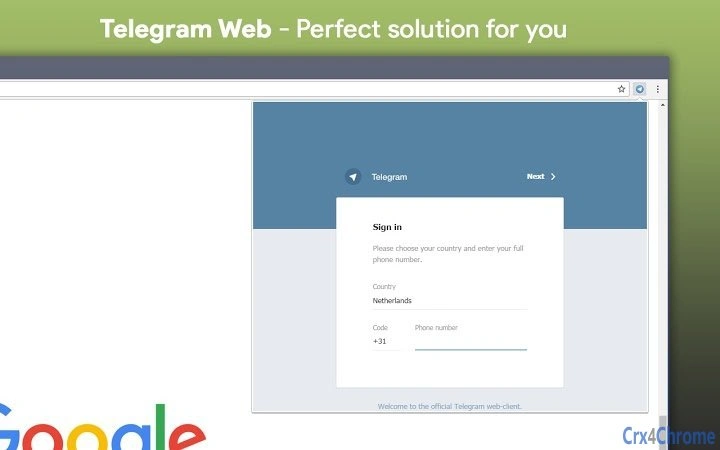
- Instant Pop-up Access – Click the extension icon to open a compact Telegram client directly in a popup window, enabling immediate access to all chats and settings.
- Real-Time Notifications – The icon displays visual indicators for new messages, ensuring users never miss important updates.
- Customizable Interface – Users can adjust the popup window size and notification colors to suit their preferences and workflow style.
- Browser-Agnostic Access – Works on any webpage within Chrome, allowing uninterrupted access regardless of the current browsing context.
- Lightweight Design – At just 1.5 MB, the extension consumes minimal system resources, ensuring fast loading and low memory usage.
These features are ideal for users who value speed and simplicity. For example, a content creator can check messages while editing a document, or a project manager can respond to team alerts without closing their task dashboard. The ability to resize the popup window makes it adaptable for both quick glances and more detailed interactions.
By focusing on core functionality—access, notifications, and customization—the extension avoids unnecessary complexity. It is designed to be intuitive, requiring no setup or configuration beyond installation. The developer’s emphasis on reliability suggests that the extension maintains stable connections and consistent performance across sessions.
User Interface, Workflow & Performance
The user interface is minimal and focused, built around the Chrome extension popup. Upon activation, a clean, responsive window appears with a familiar Telegram layout, including chat lists, message threads, and settings options. Navigation is straightforward, relying on standard click-and-scroll interactions typical of web applications.
Workflow efficiency is high, as users can access their entire Telegram experience without switching contexts. The extension operates independently of the current webpage, allowing seamless transitions between browsing and messaging. The popup window can be resized manually, offering flexibility for different screen sizes and user preferences.
Performance details were not specified by the developer. However, the small file size of 1.5 MB suggests low overhead, and the extension’s reliance on the official Telegram web client implies optimized loading times. The developer claims consistent functionality, indicating stable behavior during extended use. No information was provided about CPU or RAM usage patterns.
Stability appears to be a key design goal, with the developer noting that the extension works reliably where others fail. This suggests effective handling of connection states, session management, and background processes. Users can expect consistent behavior across sessions, though real-world performance may vary based on network conditions and browser load.
Compatibility & System Requirements
The extension is compatible with Windows, Mac, and Linux operating systems, ensuring broad accessibility across desktop environments. It is designed specifically for Google Chrome, meaning it will only function within this browser. The software version is 1.2.3, and the installation size is 1.5 MB.
Exact system requirements were not listed. However, since it runs as a Chrome extension, it will require a modern version of Google Chrome to operate. The developer did not provide additional system requirements or hardware specifications.
Platform compatibility information is limited to the operating systems and browser mentioned. No details were given about supported Chrome versions, internet speed requirements, or storage needs beyond the file size. Users should ensure their Chrome browser is up to date for optimal performance.
Pros and Cons
Pros
- Instant access to Telegram via a single click from the Chrome toolbar.
- Lightweight at only 1.5 MB, minimizing system impact.
- Real-time notifications with visual indicators on the extension icon.
- Customizable popup window size and notification colors.
- Reliable performance, claimed to work consistently where other extensions fail.
Cons
- Only available for Google Chrome, limiting cross-browser use.
- Not an official Telegram extension; developed independently.
- Exact system requirements were not specified.
- No built-in offline mode or message synchronization beyond the web client.
- Customization options are limited to window size and colors.
FAQ Section
Is this extension compatible with all versions of Chrome?
The extension is designed for modern versions of Google Chrome. For best results, ensure your browser is up to date. Specific version compatibility was not provided by the developer.
Is the extension secure to use?
The extension functions as a wrapper for the official Telegram web client and does not store user data locally. It relies on Telegram’s secure connection protocols. However, as an independent developer tool, it is not officially endorsed by Telegram.
Can I use this extension offline?
Since the extension uses the official Telegram web client, it requires an active internet connection to function. There is no built-in offline messaging or synchronization capability.
How often does the extension update?
Updates are released by the independent developer as needed. The current version is 1.2.3. Users are encouraged to keep the extension updated for optimal performance and security.
What type of license does this extension use?
The extension is free to download and use. The developer has not specified a formal license type beyond its open availability in the Chrome Web Store.
Final Thoughts
The Telegram Web Extension for Chrome delivers a focused, reliable solution for users seeking quick access to their Telegram account without launching a full desktop app. Its minimalist design, instant pop-up access, and real-time notifications make it ideal for professionals and casual users alike who value efficiency and seamless integration into their workflow.
While it is not an official Telegram product, its emphasis on stability and consistent performance sets it apart from many third-party alternatives. The lightweight footprint and customizable interface further enhance its appeal. For users already invested in the Chrome ecosystem, this tool offers a practical and secure way to stay connected.
Download Telegram Web Extension for Chrome now







